关于 Kubenetes 如何实现 pod 以及 pod 和 container 的区别
下面这篇文章很好的解释了Kubenetes 如何实现 pod, 从而很好的理解 container 和 pod 的区别与联系.
https://iximiuz.com/en/posts/containers-vs-pods/
下面这篇文章很好的解释了Kubenetes 如何实现 pod, 从而很好的理解 container 和 pod 的区别与联系.
https://iximiuz.com/en/posts/containers-vs-pods/
最近研究 JDK 和 Netty 里面 socket timeout 的实现, 代码层面从 Java 代码一直追踪到 Linux 上的系统调用 poll. 当查看 poll 的手册的时候, 注意到一个不正常的描述.
首先, 通过 google 找到的是这个手册: https://linux.die.net/man/2/poll. 这个手册里面有关于 poll 的 timeout 参数的描述是:
The timeout argument specifies the minimum number of milliseconds that poll() will block.
注意, 它使用的是 "minimum", 那么对于正数的 timeout 值, 我可以有这些可能的理解:
怀着这个问题, 我又返回去看 JDK 里的代码:
http://hg.openjdk.java.net/jdk8/jdk8/jdk/file/687fd7c7986d/src/windows/native/java/net/SocketInputStream.c#l101
还是无法理解.
于是重新 google 搜索, 找到了这个问答:
https://stackoverflow.com/questions/529975/what-does-poll-do-with-a-timeout-of-0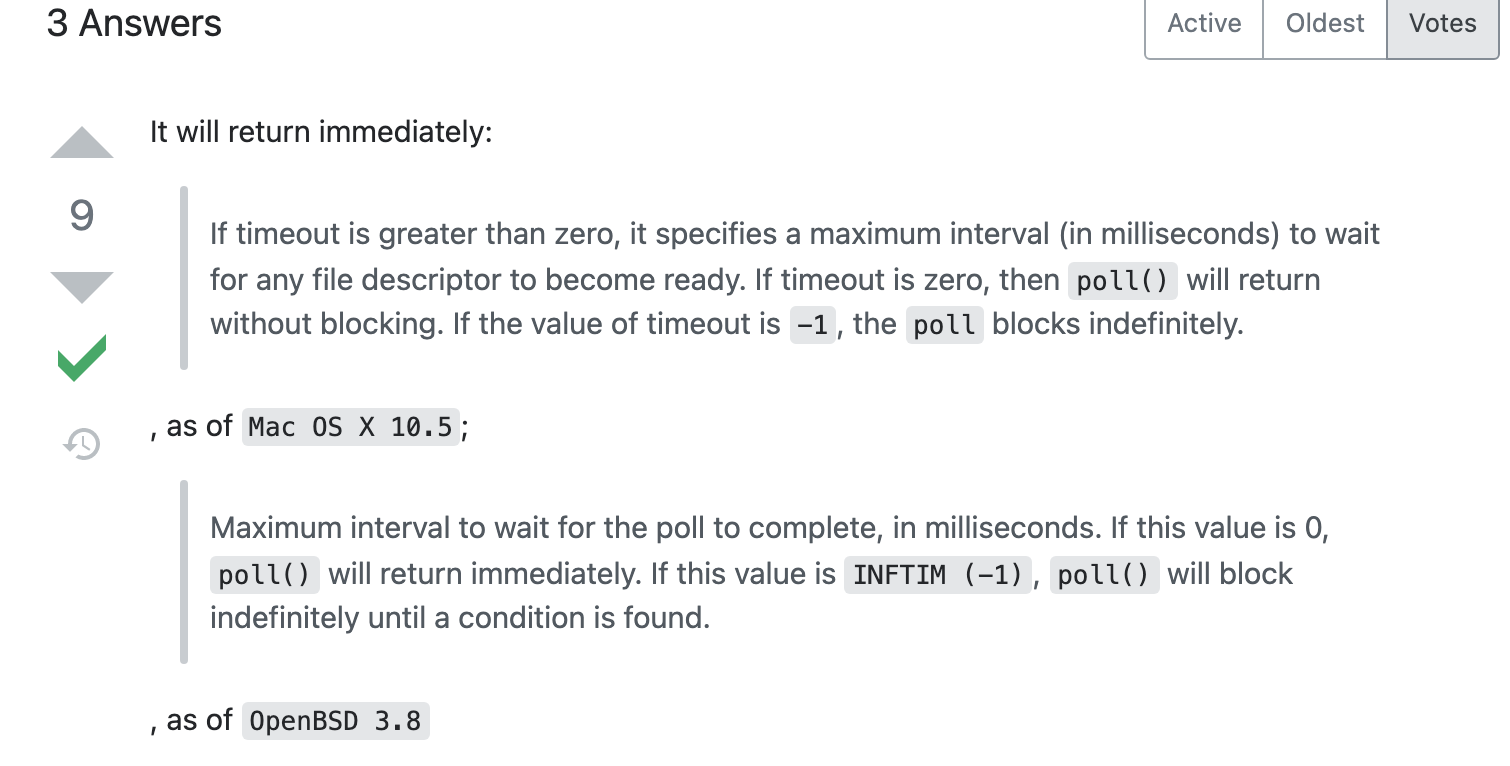
回答里面明显表明这是最大等待时间, 于是重新找另外的 Linux man page:
https://man7.org/linux/man-pages/man2/poll.2.html
The timeout argument specifies the number of milliseconds that poll() should block waiting for a file descriptor to become ready.这里的意思, 就没有任何歧义了, 就是最大等待时间.
限定搜索结果在某个或某些站点 -> 使用 site:
site:github.com
site:*.edu
完全匹配多个字符 -> 使用双引号 ""
"Steve Jobs"结果不包含某些字符 -> 使用减号 -
Socket -network模糊匹配 -> 使用星号 *
steve * apple或者 -> 使用 or 或 |
steve or gates词典 翻译 -> 使用 define:
define:star返回最新缓存的 -> 使用cache:
cache:ebay.com特定文件类型 -> 使用 filetype: 或 ext:
Distributed Systems, 3rd Edition filetype:pdf搜索相关站点 -> 使用 related:
related:github.com搜索关键字在标题, url, 文本, 超链接 -> intitle: inurl: intext: inanchor:
intitle:star
inurl:star
intext:star
搜索关键字全在标题, url, 文本, 超链接 -> allintitle: allinurl: allintext: allinanchor:
allintitle:star life water
allinurl:star life water
allintext:star life water
多个条件组合 -> 使用括号
(steve or jobs) rich工作中从来没用到过 Redis, 偶尔看过文档, 这次在学习数据库的理论一本书的过程中, 又萌发了要学习一边 Redis 的兴趣.
主要文档: https://redis.io/documentation
主要书籍:
Redis Essentials (Packt, 2015) by Maxwell Da Silva and Hugo Tavares
实践: docker 安装 https://hub.docker.com/_/redis
$ docker network create redis-network
$ sudo docker run --network redis-network --restart always --volume /home/supra/work/data/redis/data:/data --name redis -p 6379:6379 -d redis redis-server --save 60 1 --loglevel warning
$ docker run -it --network redis-network --rm redis redis-cli -h redis
Redis Essentials 笔记:
Grafana 提供了很多各种各样的图表, 被广泛用在各种需要仪表盘(dashboard)的场合. 它默认提供的搜索, 可以搜所有的文件夹名字和 dashboard 的名字. 可是有时候我们只看到别人给了一个 panel 的截图, 如何根据 panel的名字找到对应的 dashboard 呢? 当你有上千个 dashboard 的时候, 这种情况变得很困难.
最好的方式是 Grafana 提供这样一个插件, 可以搜索所有的文件夹(folder)/仪表盘(dashboard)/面板(panel)的名字, 但是我们现在没有找到.
其次, 这些文件夹(folder)/仪表盘(dashboard)/面板(panel)都定义在 grafana 背后的一个数据库中, 如果这个数据库的表提供了全文索引, 也能方便我们搜索. 但是现在也没有.
那么有没有可能我们把所有的 文件夹(folder)/仪表盘(dashboard)/面板(panel) 的标题放到一个支持全文索引的产品里面, 然后提供一个索引搜索的可能呢?
这种方式是可行的. 首先, Grafana 提供了一整套的 API, 我们可以通过 API 列出所有的文件夹, 然后列出每个文件夹下的所有 dashboard, 然后查询每个 dashboard 的每个 panel , 这样我们就能获得 文件夹(folder)/仪表盘(dashboard)/面板(panel) 的所有标题了. 接着, 我们把获得的标题放到一个支持全文索引的产品, 就能支持全面搜索了.
这里我们给出一个 JavaScript 的脚本, 当你打开你的 Grafana 之后, 然后登录, 然后打开开发者工具, 选择 Console tab, 然后运行这个脚本. 当脚本运行完之后, 在运行导出脚本, 它会打印所有要导出的 json 内容, 然后把这些 json 内容复制到文本编辑器, 然后保存到本地.
使用这个脚本
https://github.com/manecocomph/scripts/blob/main/JavaScript/grafana/exportAllTitles.js
当上面的脚本运行完之后, 可以看到上面的文件结尾处在注释的地方有个导出脚本, 运行导出脚本. 导出完之后, 复制保存到本地.
安装 MongoDB 和 webUI. 更改下面的 volume 到你的本地文件夹
sudo docker network create mongo-network
sudo docker run --network mongo-network --restart always -p 27017:27017 --volume /home/supra/work/data/mongo/grafana:/data/db --name mongodb -d mongo
sudo docker run --network mongo-network --restart always -e ME_CONFIG_MONGODB_SERVER=mongodb -p 8081:8081 --name mongoui mongo-express
可以选择 webUI 导入, 或者使用下面的命令行在 docker 容器内导入(更改 db 名字和 collection 名字, 以及文件名)
mongoimport --db dbName --collection collectionName --file fileName.json 设置全文索引, 如何查询
db.grafana.createIndex({title: "text", folder: "text", panels: "text", });
db.grafana.find({$text: {$search: "EricTian"}});安装 ES & Kibana
sudo docker network create elastic-network
sudo docker run --restart always --name es01 --network elastic-network -p 9200:9200 -p 9300:9300 -e "discovery.type=single-node" -d docker.elastic.co/elasticsearch/elasticsearch:7.15.2
sudo docker run --restart always --name kib01 --network elastic-network -p 5601:5601 -e "ELASTICSEARCH_HOSTS=http://es01:9200" -d docker.elastic.co/kibana/kibana:7.15.2
打开 http://host:5601/ 然后导入数据文件, 然后查询
安装 Splunk
sudo docker run --rm -p 8000:8000 -e "SPLUNK_START_ARGS=--accept-license" -e "SPLUNK_PASSWORD=admin" --name splunk splunk/splunk打开 http://host:8000/ 输入用户名/密码 admin/admin 然后选择导入数据文件, 然后查询